.svg)
.svg)


How to Migrate an Old Application Without Disrupting Your Business
Key Takeaways
- Application migration is the process of moving an old or legacy application to a newer environment, platform, or codebase without losing what makes it valuable to your business.
- The real risk is not the migration itself. It is downtime, and for over 90% of mid-size and large enterprises, a single hour of downtime now costs more than $300,000.
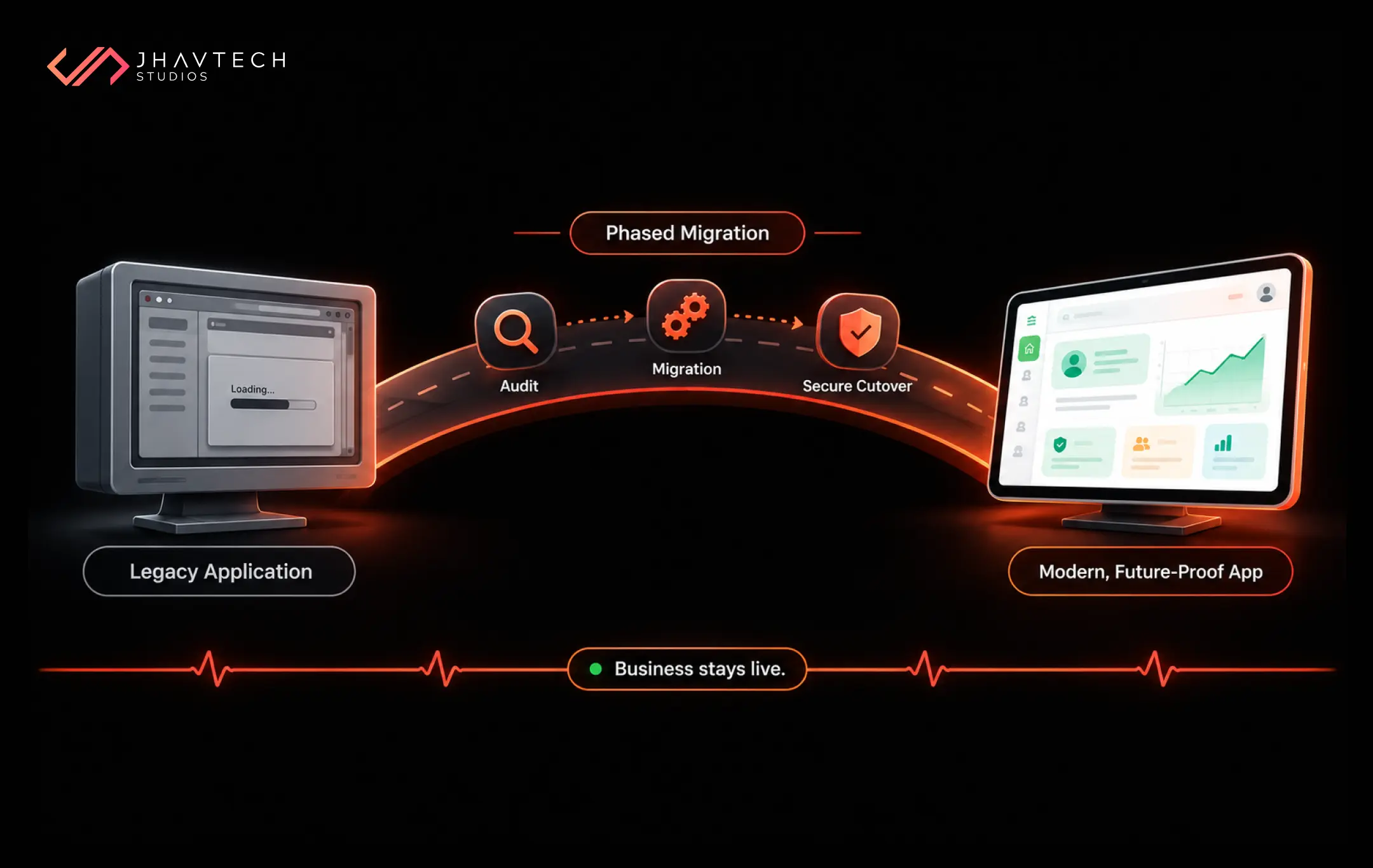
- A phased software migration strategy lets you upgrade in the background while your business keeps running.
- This blog covers the six-phase approach, a readiness checklist, and the migration patterns (rehost, replatform, refactor, rebuild) that fit startups and SMEs.
- Done right, legacy application migration cuts infrastructure costs, closes security gaps, and clears the runway for AI and future growth.
Let me be honest about something most vendors will not tell you upfront. The scariest part of touching an old application is not the code. It is the fear that the moment you start moving things, something breaks, customers notice, and revenue walks out the door.
That fear is reasonable. It is also the exact reason so many businesses cling to software that is quietly costing them a fortune.
If you have ever muttered "it works, so let's not touch it," this one is for you. Because here is the thing: moving an aging application to something modern does not have to mean pulling the plug and praying. With the right software migration strategy, you can migrate in the background, keep serving customers, and switch over so smoothly that most people never notice anything changed. Let's get into how.
What Application Migration Means (and Why It Is Not Optional Anymore)
Application migration is the process of moving a software application from one environment to another, such as shifting from on-premise servers to the cloud, upgrading an outdated framework, rebuilding a tangled codebase, or replacing an old database with something faster and more secure.
Legacy application migration is a specific flavour of this: taking software that was built years ago, often on technology that is now hard to hire for or expensive to maintain and bringing it into the present. Application modernisation is the broader umbrella term for the whole effort of making old software fit today's business goals, security standards, and performance expectations.
This is the kind of work our team at Jhavtech Studios has been doing since 2011, across web, mobile, and desktop platforms, for clients ranging from early-stage startups to the University of Melbourne. We mention that not to brag, but because migration is one of those jobs where scar tissue matters. You want the people planning it to have already made the mistakes on someone else's dime.
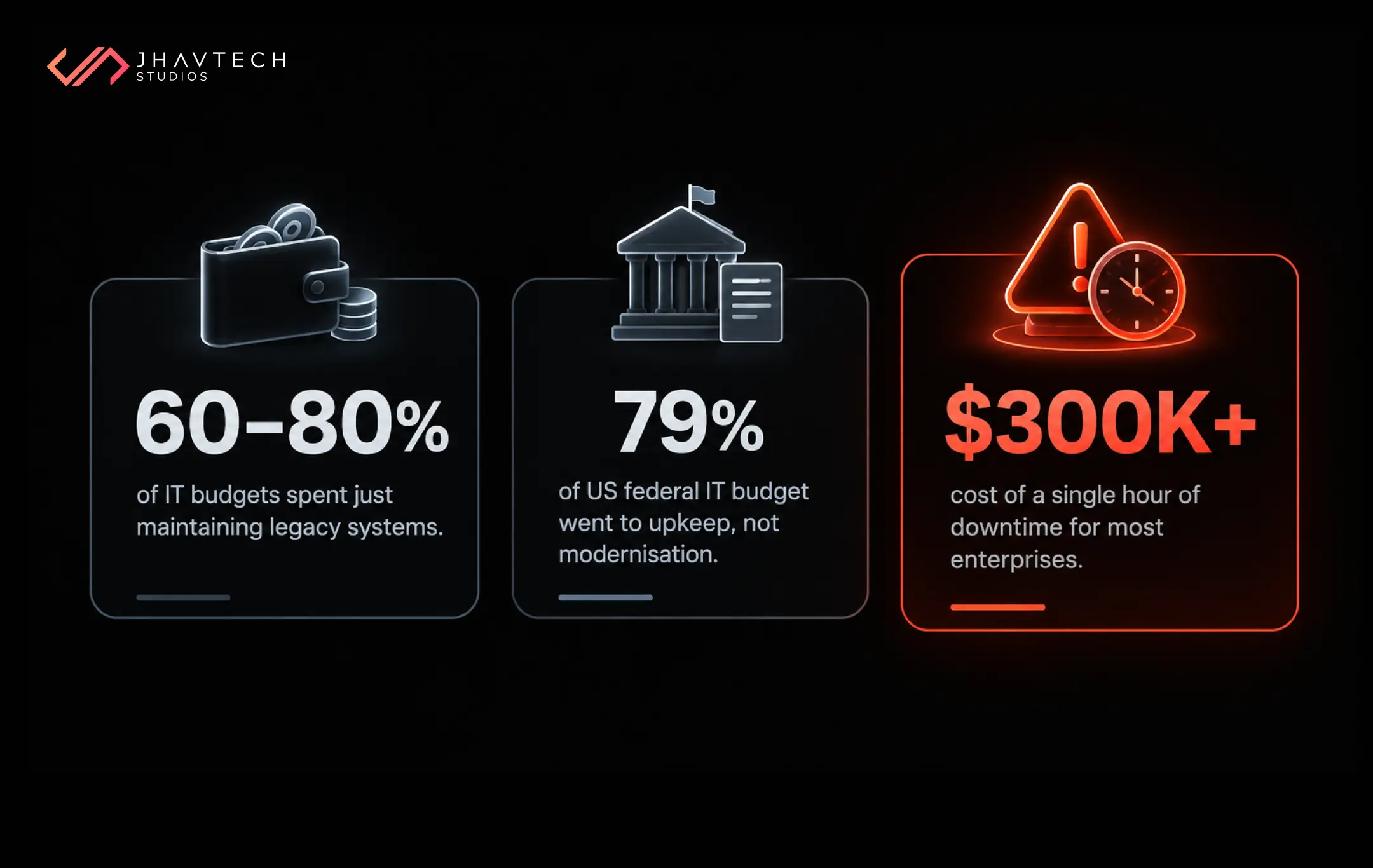
So why has "let's not touch it" become a genuinely risky position? A 2025 survey of more than 500 US IT professionals found that 62% of organisations still use legacy systems, even though 43% flag security vulnerabilities as a major concern. Meanwhile, commonly cited industry estimates put legacy maintenance at 60% to 80% of the typical IT budget. The public sector shows just how lopsided this gets: a 2025 GAO review found the US federal government spent 79% of its IT budget on operations and maintenance rather than modernisation.
And the cost of getting migration wrong? That is where downtime comes in. According to the ITIC 2024 Hourly Cost of Downtime Survey, the average cost of a single hour of downtime now exceeds $300,000 for over 90% of mid-size and large enterprises. For a lean startup or SME, even a fraction of that can sting for months.
So the question is not whether to modernise. It is how to do it without the outage that keeps you up at night.
The Real Enemy Is Downtime, Not Change
Let's reframe the whole problem. When people say they are afraid of migration, what they usually mean is that they are afraid of disruption: the checkout page going dark during a sale, the booking system freezing mid-transaction, the internal tool your team lives in suddenly refusing to load.
Legacy systems make this worse, not better. Because they are often tightly coupled and poorly monitored, when one part fails it tends to drag others down with it, and recovery is slow because there is no automated failover. A modern, well-migrated application is far more resilient. Ironically, the thing you are afraid to touch is the thing putting you most at risk.
The fix is a mindset shift. Treat continuity as the number one design requirement of the whole project, not an afterthought. Every decision, from which migration pattern you pick to how you cut over, gets filtered through one question: does this keep the business running? Plan that way and disruption stops being an inevitable side effect. It becomes something you actively engineer out.
A Quick Story from the Trenches
Let me make this concrete. One of our clients, Mindset Coach Academy, came to us with a web application that had grown into something fragile and hard to maintain. The assessments, reporting, and coach-to-client workflows all worked, technically, but the platform had reached the point where every small change felt risky and the user experience was quietly suffering.
Rather than tearing it down and starting over, we stabilised the existing system first, then rebuilt the weak parts and reworked the UI/UX around how coaches and clients used it. The platform kept serving its users throughout. No dramatic "we're offline this weekend" email. Just a steadily improving product that ended up more scalable than the thing it replaced.
That pattern—stabilise, migrate the risky pieces in stages, and keep the lights on—is not unique to one project.. We have run versions of it for a dating platform rebuilding its mobile architecture and for the University of Melbourne Law School overhauling course management. You can see more of these in our portfolio of migration and rescue case studies. The common thread is that the business never had to stop to get the upgrade.
Choose Your Migration Pattern First
Before anyone writes a line of code, you need to decide how deep the migration goes. There is no universally correct answer here. There is only the right answer for your situation, your budget, and how much life your old application has left in it. These four patterns, sometimes called the "Rs" of migration, cover the vast majority of real-world projects.
The Four Core Migration Approaches
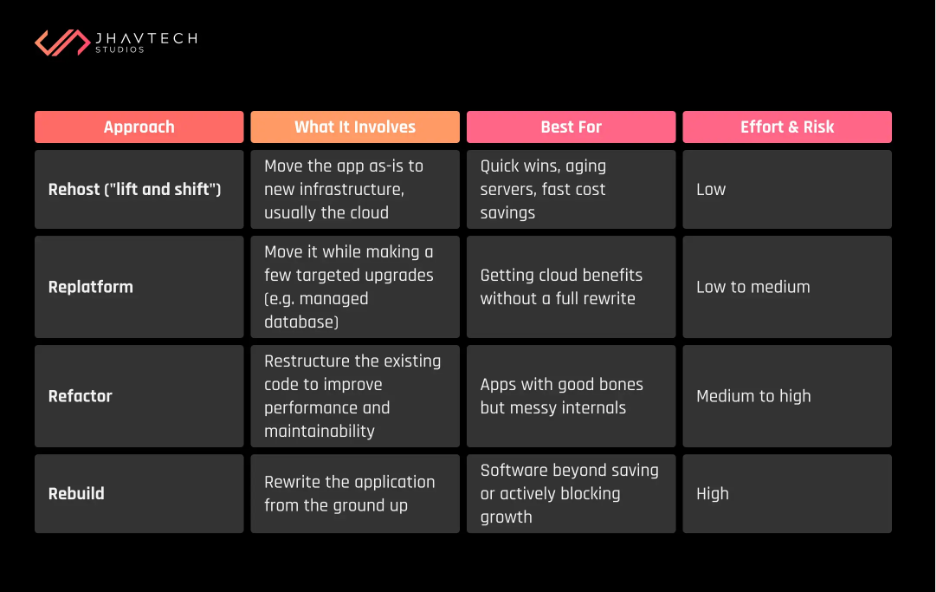
Most startups and SMEs are pleasantly surprised to learn they do not need the expensive rebuild they feared. A rehost or replatform often delivers 80% of the benefit for a fraction of the cost and risk. A good migration partner will steer you toward the lightest approach that solves your problem, not the biggest invoice.
Not sure how much of your current code is salvageable? That is your cue to get expert eyes on it before committing. An independent no-cost code assessment can tell you within days whether you are looking at a tidy replatform or a full rebuild, and it can save you from spending money on the wrong strategy entirely.
The Six-Phase Migration Roadmap
Here is the process that keeps businesses online while their software gets a new engine. Think of it less as a big-bang event and more as a careful, staged handover.
Phase 1 – Discovery and Audit
You cannot safely move what you don’t understand. This phase maps every dependency, integration, data flow, and undocumented quirk in your current application. Legacy systems are notorious here: often only one or two people truly know how they work, and that knowledge is a business risk in itself. Document everything now, while you still can.
Phase 2 – Strategy and Planning
This is where you lock in your migration pattern, define what success looks like, and, crucially, write the rollback plan. A rollback plan is your undo button: the pre-agreed steps to revert instantly if something goes wrong during cutover. Every migration that respects business continuity has one.
Phase 3 – Environment Setup
Your team builds the new environment in parallel with the old one, which keeps running untouched. This parallel-running principle is the single most important idea in disruption-free migration. The old system serves your customers while the new one is prepared quietly alongside it.
Phase 4 – Incremental Migration and Testing
Rather than moving everything at once, you migrate in slices and test each one hard before moving on. Data gets migrated and validated. Features get moved and verified against the original. This is slower than a big-bang switch, and that is precisely the point. Slow is smooth, and smooth is fast.
Phase 5 – Staged Cutover
Once the new system is proven, you switch over, ideally in stages or during a low-traffic window. Techniques like running both systems in parallel or gradually routing a small percentage of users to the new system first, mean that even if a problem slips through, only a sliver of traffic is affected and your rollback plan is standing by.
Phase 6 – Monitoring and Optimisation
The job is not done at cutover. You watch the new system closely, tune performance, and keep the old environment on standby until you are completely confident. Only then do you decommission it.
Your Pre-Migration Readiness Checklist
Before you green-light any migration project, run through this. If you cannot confidently tick most of these boxes, you are not ready to start moving yet, and honestly, that is a good thing to find out now rather than mid-cutover.
☐ We have a complete inventory of the application's features, integrations, and dependencies.
☐ We know where our critical data lives and how it will be validated after moving.
☐ We have chosen a migration pattern (rehost, replatform, refactor, or rebuild) and know why.
☐ We have defined clear success metrics and acceptance criteria.
☐ We have a written, tested rollback plan.
☐ We can run the old and new systems in parallel during transition.
☐ We have scheduled cutover for a low-traffic window.
☐ We have a monitoring plan for the first 48 hours after go-live.
☐ Key stakeholders and customers are informed of the timeline.
☐ We have expert engineering support lined up, in-house or partnered.
The Business Case: What You Really Gain
It is tempting to frame migration as a cost. It is more accurate to frame the status quo as the cost.
Staying put is not free. Legacy maintenance quietly eats the majority of many IT budgets, security holes widen, and the pool of developers who understand old technology keeps shrinking. That is money spent standing still.
Modernising, done well, flips the equation. A 2026 Thoughtworks and IDC study of organisations pursuing continuous modernisation found they achieved 45% faster product and feature releases and a 48% reduction in security risk exposure. Faster releases mean you ship features and respond to customers quicker, which for a growing business is often worth more than the cost saving itself.
Here is a simple way to picture the trade-off between the two migration philosophies.
Big-Bang vs. Phased Migration Risk
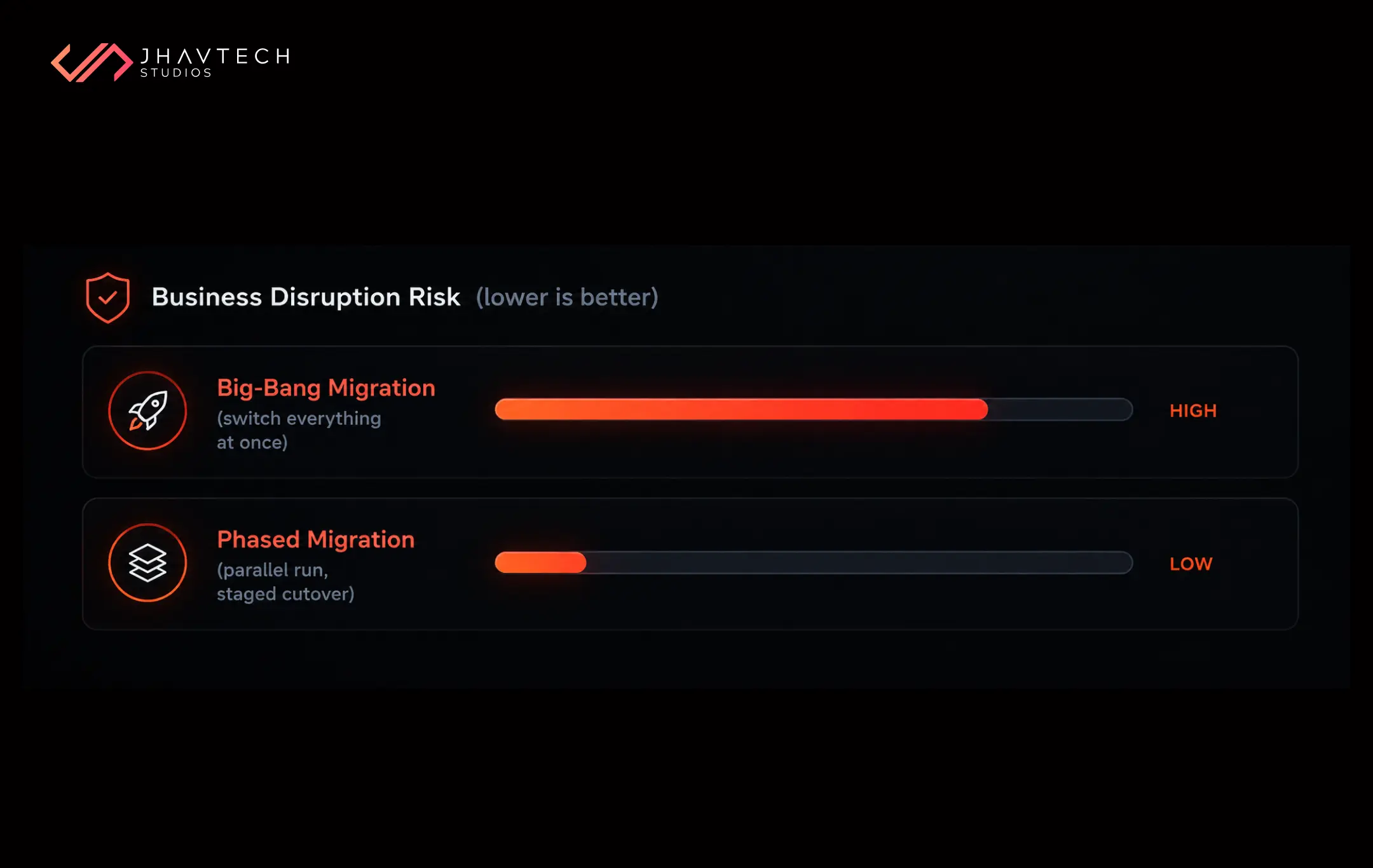
The phased approach costs a little more in time and coordination up front. What you buy with that investment is the near-elimination of the catastrophic-outage scenario. For most businesses, that is the best insurance money they will ever spend.
Common Mistakes That Cause Disruption (and How to Dodge Them)
A few patterns show up again-and-again in migrations that go sideways. Forewarned is forearmed.
The first is the big-bang switch, flipping everything over in one weekend and hoping. It occasionally works and it spectacularly does not when it fails. The second is skipping data validation, which is how businesses end up live on a new system with corrupted or missing records. The third is having no rollback plan, which turns a small hiccup into an all-hands emergency.
The fourth is subtler: migrating the mess. If your old application is a tangle of quick fixes and dead code, lifting it as-is just relocates the problem. Sometimes a targeted software rescue and recovery effort to stabilise things first is the smartest possible opening move, especially if a previous build was left half-finished or handed over by a team that has since vanished.
And if your migration involves getting an application onto phones as part of the modernisation, know that a rushed transition often shows up as a clunky user experience. Our take on why weak UX quietly kills mobile apps is worth a read before you assume "it still works" is the same thing as "it works well."
Should You Migrate In-House or Bring in a Partner?
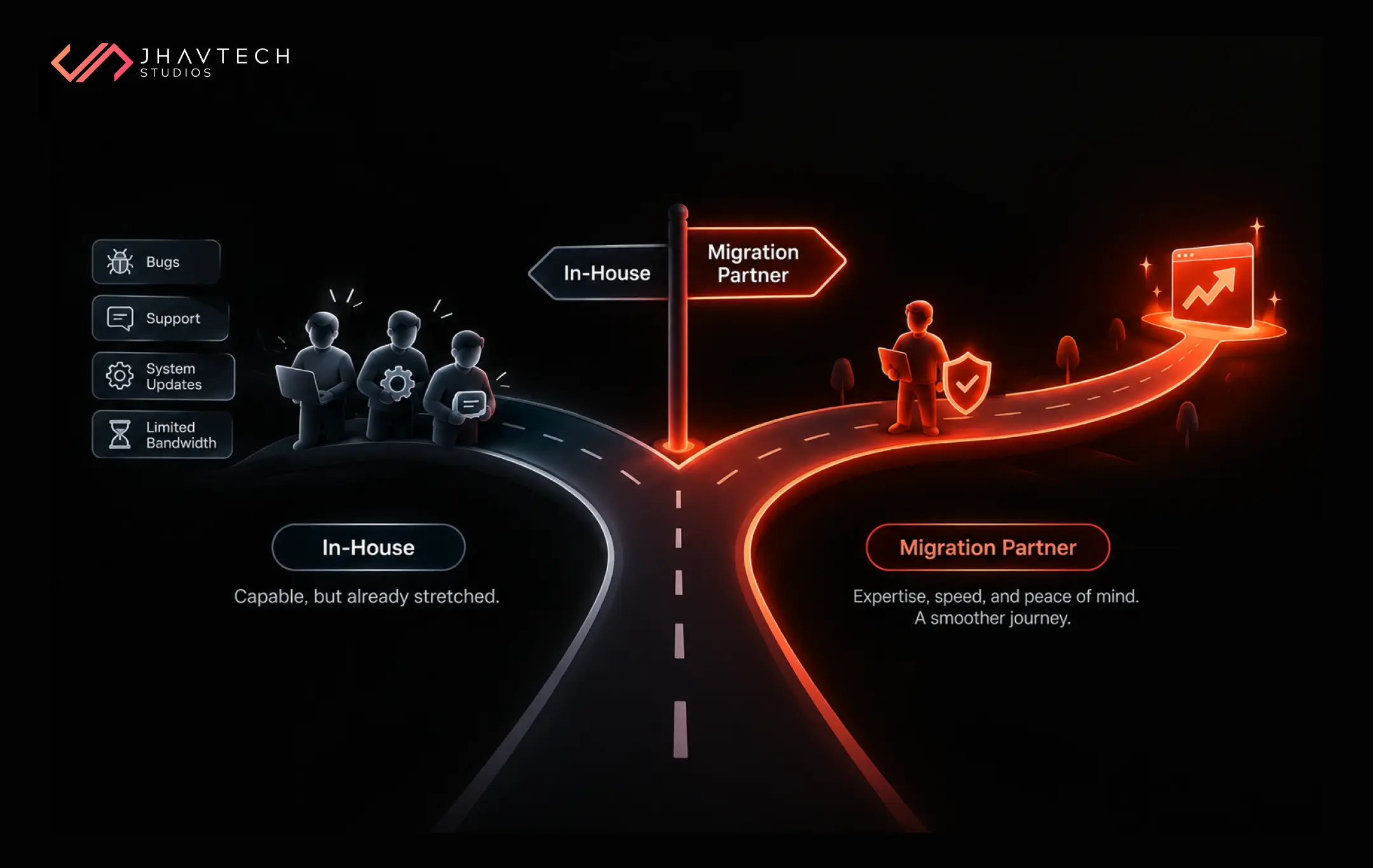
This is the honest fork in the road for most startups and SMEs. If you have a strong internal engineering team with genuine spare capacity and migration experience, in-house can absolutely work.
The reality for most lean teams, though, is that everyone is already flat out keeping the current product running, and migration is a specialised skill that punishes learning on the job. This is exactly where professional software migration services earn their keep. A dedicated partner has run this playbook dozens of times, knows where the landmines are buried, and, critically, frees your own team to stay focused on the customers and features that drive revenue. Think of it as buying expertise and insurance in a single move.
Still weighing it up? Our guide on build versus buy for software in 2026 maps almost word-for-word onto the migrate-yourself-or-partner question, and it is a useful gut-check before you commit budget either way.
And for businesses whose modernisation path leads toward mobile, pairing migration with experienced end-to-end app development for iOS and Android means you are not stitching together two separate vendors and hoping they talk to each other.
A Realistic Timeline for Startups and SMEs
People always want to know how long this takes, and the honest answer is that it depends on your migration pattern and application complexity. That said, here are grounded ballpark ranges to set expectations.
A straightforward rehost or replatform of a modest application often runs four to eight weeks end to end. A refactor with meaningful code changes typically lands in the two-to-four-month range. A full rebuild is a genuine project, usually four months and up, and should be planned in phases with working software delivered along the way rather than one distant finish line.
The encouraging trend is that these timelines are shrinking. AI-assisted tooling is compressing the slow discovery and translation phases of modernisation, which is one reason average modernisation project costs have been falling year on year. Migration in 2026 is faster and less painful than it was even two years ago.
Final Thought
The application you are afraid to touch is not protecting your business. It is quietly holding it back and, every day it runs on borrowed time, adding risk. Migration is not the dangerous move here. Standing still is.
Do it in phases. Keep the old system running until the new one has earned your trust. Write the rollback plan you hope you never need, and lean on people who have done this before. Handled that way, the switch-over your customers were dreading turns out to be the switch-over they never even notice. That is what a good migration looks like: nothing appears to happen, and then everything just works better.
Frequently Asked Questions
.webp)
.png)
.png)

.png)
.png)
.png)
.png)


.png)
.png)
.png)
.png)