.svg)
.svg)


iPadOS 13 Delivers Key Features that Enthusiasts Desperately Want
.png)
Apple announced the release of iOS 13 and the company opted to give its beloved iPhone and iPad separate operating systems. The iPhone is powered by iOS 13 while the iPad runs on a system dubbed iPadOS. While it was crafted from the same platform as the iOS 13, the iPadOS comes with some cool tweaks and a ton of new features.
The Home Screen has a desktop class Safari browser. It now has widgets and finally multiple app instances!Just a bit of a teaser there, so without further ado, here are some of the best features of iPadOS 13 that you should know about:
Dark Mode
This is the first thing that you’ll notice when setting up your iPad following the OS update. It can be programmed to automatically turn on at sunset or at a specific time. And as the name suggests, it makes the background black and the text white. Dark Mode works across the entire OS, in addition to Apple’s own apps and third-party apps that are compatible with the new APIs.
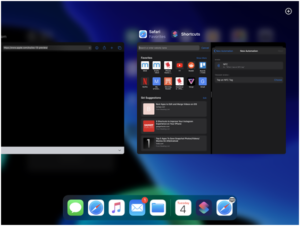
Multiple Apps in Slide Over
Now you can run multiple apps in Slide Over, making it a lot more useful.If you have an open app in the floating window, you just need to drag another app from the Dock and the two will automatically switch. At the bottom of the window you will see an iPhone style Home Bar. Swipe left or right on it to switch between all open Slide Over apps. If you wish to see all open apps, just swipe up on the Slide Over window.
Manage Open App Instances Using App Expose
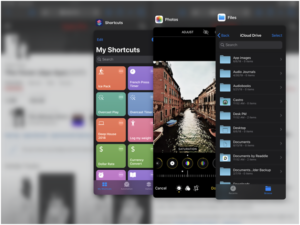
The launch of iPadOS 13 solved two major problems of working from your iPad. One is the fact that you can’t run two instances of the same app. Now you can run several instances of an app, across multiple spaces and manage all of them from the App Expose UI.
This new feature gives you a lot of freedom. You can grab a portion of an app, like a tab from Safari or a note title from the Notes app, drag it to the edge of the screen and drop it there to make another instance of it. When an app is open and you tap on its icon, all the instances of that app will be displayed. If you want to quit any space, simply swipe up. All the other instances will stay safe.
New Floating Compact Keyboard
With a pinch in gesture you can detach the keyboard and it will transform into a floating window with a compact view. In this view, you can even use gestures to type on your iPad’s software keyboard. This is similar to SwiftKey and you just need to glide your finger on the keys instead of typing on them. This new feature greatly improves the one-handed operation of the iPad.
New Sleek Home Screen with Widgets
Apple also redesigned the iPad Home screen grid to take advantage of the massive display. For the 11-inch iPad Pro you will now have a row of 6 icons.
Swipe from the left edge of the Home screen and the Today View widgets will be docked to the left edge. More importantly, you can easily view and use all your widgets. You can also it so it’s readily accessible from the Edit menu.
In a nutshell, the tweaks bring an updated Home screen that allows you to pull out Today View Widgets and major updates to Slide Over or Split View.
Desktop Class Safari
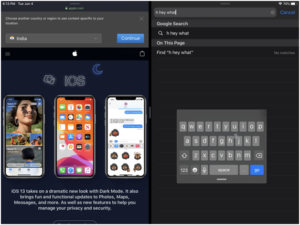
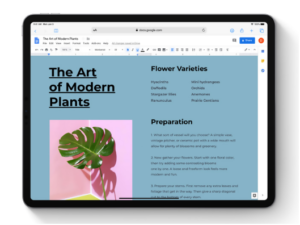
Safari automatically displays a website’s desktop version for the iPad. Surfing the web is now more immersive and it’s like having the Internet the palm of your hands! Website scaling maximizes the huge iPad screen, so you can view websites at their optimal size.The other powerful features discussed this article make Safari in your iPad comparable to desktop-class browsing experience. Scrolling within web pages has become faster and more fluid.
Files App Finally Works with External Storage
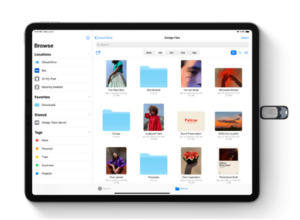
Files app in iPadOS 13 now works with external storage. This is one of the upgrades that iPad users have been clamoring for and it seems Apple has finally the call. You can connect a flash drive an external hard drive, or even an SD card to your iPad so you can directly transfer files.
Files app will recognize it as a storage device and will allow you to interact with it using other apps too. You will also be able to save data from the apps to external storage. As for the SD card, you can now import photos directly to an app without going through Files first.
Enhanced Photos Experience
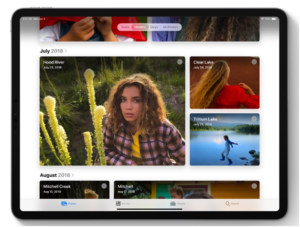
The Photos app on the iPad also gets a major upgrade. Perhaps the most impressive thing is that it’s quite fast. This is important because there are folks who shoot lots of photos and simply let them pile up. Being able to quickly zoom in and out of different views allows you to search for what you need without knowing the precise search term.
Apple also changed how your iPad automatically organizes photos. There’s a new tab bar at the top with All Photos, Days, Months and Years. The time-based ones will automatically group your photos into events that Apple believes you’ll want to see, complete with lead art.The cool thing about these views is that they filter out screenshots, but they are still stored in the All Photos section.
The Photos app has a new photo editor. To access it, simply tap on the Edit button. The new user interface is a lot more visual and more convenient to use. The standard tools are still available, but you’ll get new ones for editing Brilliance, Highlights, Saturation, Shadows, among others.
A smarter and Smoother Siri
Siri gets a ton of upgrades in iPadOS. It comes with a new voice system dubbed‘Neural Text to Speech.’ This system uses a neural network to completely generate the voice in software unlike before when pieces of audio were merely stitched together to form words. This means Siri will sound more natural while speaking longer phrases.
Siri Shortcuts is now integrated into the operating system, instead of requiring download from the App Store. It will use machine learning to form suggested automations for common series of tasks.
So there you go, now you have some idea of the new features that you can expect from iPad’s latest OS. The tweaks bring substantial upgrades to the previous iterations. In fact the iPadOS 13 is regarded as the biggest update that the iPad has received in recent years. With the slew of major improvements rolled out by Apple, it is clear that the tech giant wants to make sure that its beloved iPad becomes more productive than just being large tablets used for playing games or watching Netflix.




.png)
.png)
.png)
.png)
.png)
.png)
.png)
.png)
.png)
.png)
.png)

.png)
.png)
.png)
.png)
.png)
.png)
.png)
.png)
.png)

.png)
.png)
.png)
.png)
.png)
.png)
.png)
.png)
.png)
.png)
.png)
.png)
.png)
.png)
.png)
.png)
.png)

.png)
.png)
.png)

.png)
.png)
.png)
.png)

.png)


.png)


.png)




.png)




.png)




.png)

.png)



.png)


.png)


.png)
.png)