.svg)
.svg)


Why Your App Is Not Scaling: Real Causes (and How to Fix Them)
.png)
Everything worked perfectly... until it didn't. Traffic spiked, load times ballooned, and users started bailing. If that sounds familiar, the problem isn't bad luck. It's architecture. Here's what's really going on.
Your app passed every test you threw at it. Ten users? Smooth. A hundred? Still fine. Then you ran a campaign, landed some press coverage, or simply grew and suddenly the whole thing creaked to a halt. Response times went through the roof. The server threw errors. Your inbox filled with complaints.
This isn't a freak accident. It's one of the most predictable failure patterns in software development, and it happens to startups and established businesses alike. The causes are almost always the same, and almost always traceable back to decisions made (or skipped) long before the traffic arrived.
This post breaks down the real reasons apps hit a wall at scale, with concrete examples and fixes. If your app is already struggling, there's a clear path forward. If you're earlier in the journey, consider this your pre-emptive strike.
What "Scaling" Actually Means and Why It's Not Just About Servers
Most people hear scaling and immediately think: add more servers. That's part of it, but it's usually not the problem, and throwing hardware at a fundamentally broken architecture is like adding lanes to a road full of potholes. You move faster for a moment, then hit the same bumps at higher speed.
True scalability means your app can handle a growing number of users, requests, and data volumes without service degradation. It's a design property, something baked into the codebase and infrastructure from the start, not bolted on later when things go wrong.
According to Uptime Institute's 2024 Annual Outage Analysis, 53% of all significant outages stem from IT and network issues, and the majority were rated as preventable. Preventable. That's the part that stings.
$14,056 / minute
The average cost of unplanned downtime across all organisation sizes, according to EMA Research's 2024 analysis. For mid-size and large enterprises, ITIC's 2024 survey found over 90% now report a single hour of downtime costs more than $300,000.
That number gets very real, very fast when your app goes down during a product launch or a sales campaign. And in Australia, where digital-first businesses are scaling faster than ever, the tolerance for poor performance is paper-thin.
The Real Reasons Your App Is Not Scaling
Let's get specific. Here are the culprits we see most often; not the theoretical ones from computer science textbooks, but the actual problems showing up in real codebases across Australia and beyond.
1. Your Database Was Never Built to Grow
This is the number one killer, and it hides in plain sight. A database that works beautifully with 10,000 records often collapses under the weight of 10 million. The reasons: missing indexes, unoptimised queries, and a schema designed for convenience rather than performance.
Take the example of Pinterest's early growth phase. As they scaled, they had to repeatedly re-engineer their database architecture, migrating from a single MySQL instance to a sharded setup, because their initial design simply couldn't handle the volume. They had the engineering talent to pull it off. Most businesses don't.
Common database scaling failures include queries that scan entire tables instead of using indexes, N+1 query problems (where one request triggers hundreds of follow-up queries), and databases that hold user sessions, making it nearly impossible to run multiple server instances in parallel. If your codebase has any of these, you're sitting on a time bomb.
2. You're Running Monolithic Architecture That Can't Be Pulled Apart
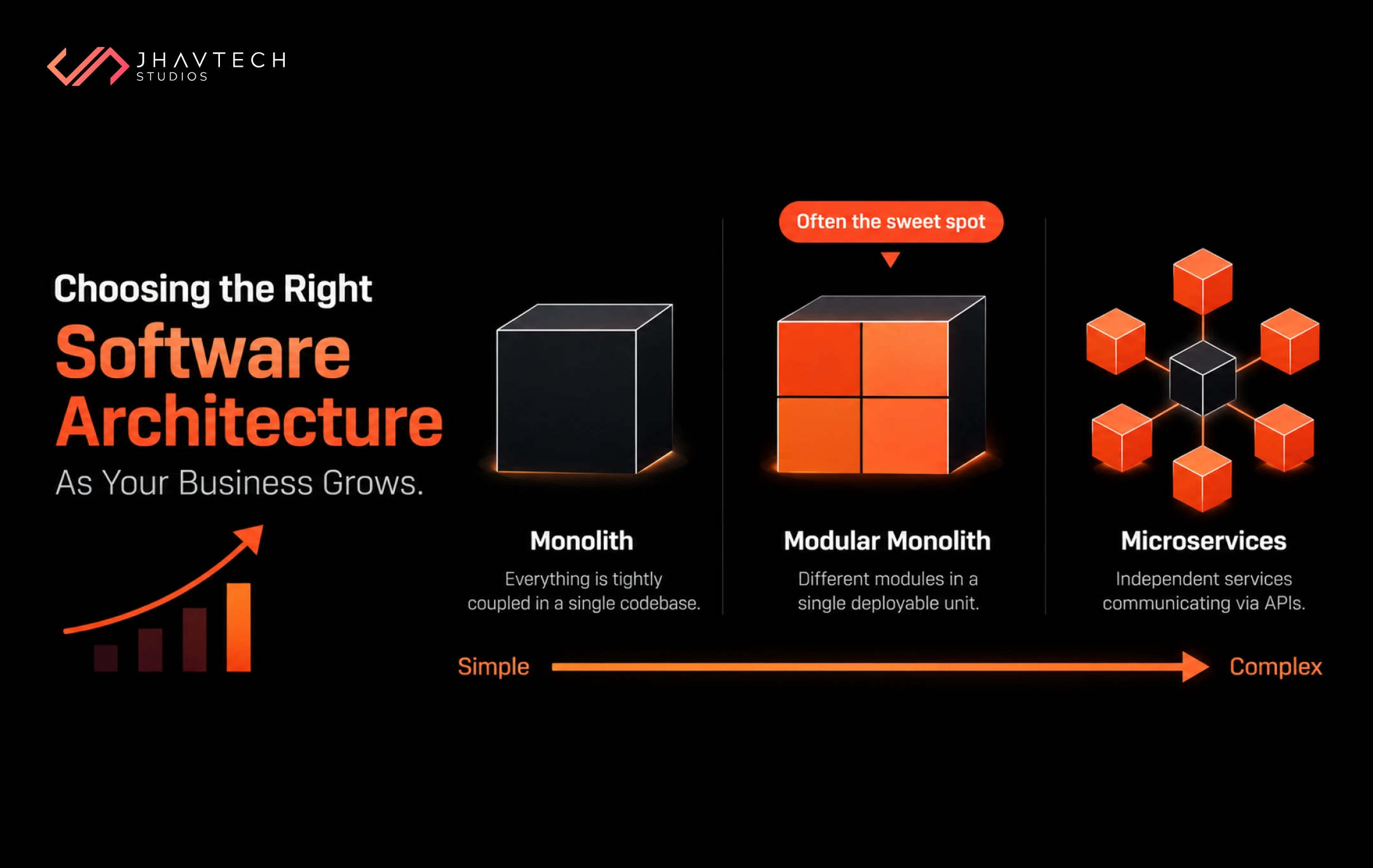
A monolith isn't inherently bad. For early-stage products, it's often the right call — faster to build, simpler to manage. The problem comes when a monolith grows into something so tightly coupled that you can't scale one part of it without scaling all of it.
Imagine your image-processing feature is the bottleneck. In a monolith, you can't just spin up more instances of that one component; you have to replicate the entire application, wasting resources and compounding the very problem you're trying to solve. Microservices architecture solves this by breaking the app into independently scalable services. But migrating to microservices mid-flight is a major undertaking, and it requires the kind of structural expertise that not every development team has on hand.
Twitter's famous 2009 "Fail Whale" era is the textbook example. Their monolithic Ruby on Rails backend simply couldn't handle the load, leading to years of intermittent outages until they rearchitected their systems from the ground up. The lesson? The longer you wait to address monolithic constraints, the more painful (and expensive) the fix becomes.
3. Everything Runs Synchronously When It Shouldn't
Every time a user triggers an action in your app, what happens next? If the answer is "the server does everything at once and waits for each step to finish before responding," you have a synchronous processing problem and it will strangle your app under load.
Sending a confirmation email, generating a PDF, resizing an uploaded image, hitting a third-party API — none of these need to happen before your user sees a response. They should be handed off to a background job queue and processed asynchronously. When they're not, every synchronous operation adds to server response time and under heavy traffic, that stacking effect kills performance fast.
This is especially true for mobile-facing backends. When your app is waiting on a sluggish server, users don't just get frustrated; they leave. And in 2025, Google's research shows that 53% of mobile users abandon a site that takes more than three seconds to load. Synchronous bottlenecks are often the silent cause.

4. No Caching Layer — So You Compute the Same Things Over and Over
Here's a simple question: how many times per day does your app recalculate or re-fetch data that hasn't changed? For most apps, the answer is thousands (or millions) of times. Every request hits the database, the database does the work, and the result gets thrown away the moment the response is sent.
A properly implemented caching layer stores frequently accessed data in memory so you're not re-running expensive queries for every request. The difference in performance can be dramatic: we're talking 10x to 100x faster response times for common operations. Yet many production apps have no caching strategy at all, either because it wasn't planned at the outset or because the team underestimated the load they'd eventually face.
5. Your Infrastructure Isn't Designed for Horizontal Scaling
Vertical scaling or upgrading to a more powerful server is seductive because it's easy. Buy a bigger box, buy yourself some time. But it has a hard ceiling, and it's expensive. Horizontal scaling or distributing load across multiple servers is how apps built for growth actually work.
The catch? Horizontal scaling only works if your app is stateless. That means it doesn't store session data or user state on a specific server instance. If it does, the moment a user's request hits a different server, they get logged out, lose their cart, or see an error. Fixing this requires a shift in how sessions are managed (typically by moving state to a shared cache or database), and it's not a trivial change if the app was never built with it in mind.
Australia's own MyGov platform learned this the hard way. During peak COVID-19 announcement periods in 2020 and again in 2022, the platform repeatedly crashed under traffic loads it couldn't absorb (as reported by ABC News), exposing the gap between infrastructure designed for normal demand and one built to handle traffic spikes. For a government service handling health and welfare data, the consequences were felt by millions of Australians.
6. Third-Party Dependencies You Don't Control
Your code might be perfectly optimised. But if your app depends on an external payment gateway, a mapping API, or a third-party authentication provider, and that provider starts responding slowly, your entire app slows with it.
Scalability isn't just about what you control. It's about how your app handles the things you don't. Does it implement timeouts? Does it gracefully degrade when an external service is unavailable? Does it cache API responses where appropriate? If the answer to any of these is no, an outage at a third-party provider can become your outage, even if your infrastructure is running flawlessly.
App Scalability Issues: A Quick Diagnostic Checklist
Use this table to pressure-test your own app before load does it for you. If you're ticking "No" on more than two or three of these, you have app scalability issues worth addressing now and not after the next traffic spike.
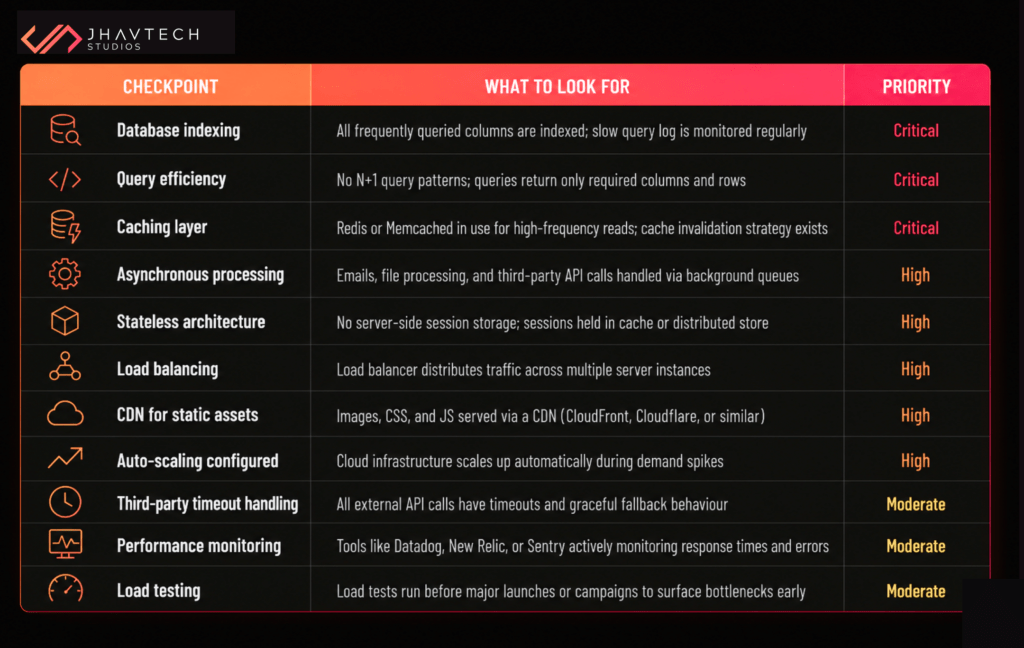
How to Fix App Performance Bottlenecks: Where to Start
If you've read this far and you're feeling a knot in your stomach, that's actually a good sign. Awareness is the first move. Here's the practical path forward.
Start With Monitoring, Not Assumptions
Before you change anything, instrument your app. Tools like New Relic, Datadog, and Sentry tell you exactly where time is being spent on each request. The fix is never obvious until you've seen the data. Guessing is how engineering teams waste months working on the wrong bottleneck.
Fix the Database Before You Upsize the Server
Nine times out of ten, the database is the first thing to profile. Run your slow query log, identify the top offenders, and add indexes where they're missing. This alone can reduce query times by orders of magnitude and it costs nothing except time.
Introduce Caching Incrementally
You don't need to rewrite your app to start caching. Identify the five or ten most expensive, most frequently run queries in your system and cache those results first. Redis is straightforward to set up and integrates cleanly with most tech stacks. Even partial caching can dramatically reduce database load.
Refactor Heavy Synchronous Tasks to Background Queues
Pull out anything that doesn't need to happen before the user sees a response and move it to a job queue. This is typically a contained change; you're not rewriting business logic, you're changing where it executes. The UX improvement is immediate and the server load reduction is significant.
If the Architecture Is the Problem, That's a Different Conversation
Sometimes the issues run deeper than configuration tweaks. If your app was built on shaky foundations or if it was built by a team that didn't anticipate the load it's now facing — incremental fixes won't be enough. That's not a failure; it's a very common inflection point in a product's growth. What it calls for is a structured architectural review and, often, a rebuild of the components that can't scale as-is.
We've written more about identifying these inflection points and what to do when you reach them — over on the Jhavtech Studios blog.
When It's Time to Call in Reinforcements
There's a specific moment and most founders who've been through it will recognise it, where the internal team has done everything they can and the app is still struggling. Maybe the original developers are no longer available. Maybe the codebase has grown into something nobody fully understands anymore. Maybe you've had three "fixes" that each solved one thing and introduced two others.
This is the point where having a team that's seen these problems before — and rebuilt apps that were in exactly this state — makes the difference between six more months of firefighting and a stable, growth-ready product.
At Jhavtech Studios, we've spent over 13 years building apps engineered to perform at scale from day one and stepping in when apps hit a wall and need someone to take the wheel. Whether it's an architectural review, a targeted performance overhaul, or a full app rescue for a product that's in crisis, the goal is always the same: make the thing work the way it should have from the start.
If you're dealing with application scalability problems right now such as crashes under load, degrading performance, or an architecture that's become a bottleneck, you don't have to figure it out alone.

Frequently Asked Questions About App Scalability Issues


.webp)
.webp)
.webp)
.webp)
.webp)

.webp)
.webp)

.webp)
.webp)





.png)
.png)
.png)
.png)
.png)
.png)

.png)
.png)
.png)
.png)
.png)
.png)


.png)

.png)

.png)



.png)
.png)
.png)
.png)
.png)
.png)
.png)
.png)
.png)
.png)
.png)

.png)
.png)

.png)
.png)
.png)
.png)
.png)
.png)
.png)


.png)
.png)
.png)
.png)
.png)
.png)
.png)
.png)
.png)
.png)

.png)