.svg)
.svg)



Imagine walking into a high-tech facility, the kind with glass walls and cutting-edge hardware, only to find that the front door is held open by a brick and the security cameras are pointed at the floor. That is exactly what it feels like for a security professional to look at the backend of a scaling startup that has prioritised speed over security. Recently, our team at Jhavtech Studios conducted a deep dive into the infrastructure of a promising Australian startup. We were not looking for flaws just for the sake of it. We were performing a routine server health check to ensure their growth was sustainable.
What we found was staggering. In a single environment, we identified 19 distinct server misconfigurations that left their data, their customers, and their reputation hanging by a thread. In the world of tech, we often hear the phrase “move fast and break things.” While that mindset works for testing a new feature, it is a recipe for disaster when applied to server architecture. According to the 2024 IBM Cost of a Data Breach Report, the average cost of a data breach has climbed to 4.88 million USD. For a startup, that is not just a financial setback; it is an extinction-level event.
To help you avoid the same pitfalls, we are breaking down these findings. By understanding these common server misconfigurations in startups, you can take proactive steps to secure your digital assets before a minor oversight becomes a major headline.
The High Cost of the “Just Get It Running” Mentality
Startups are under immense pressure to ship products. When you are focused on hitting a deadline or securing the next round of funding, infrastructure security often takes a backseat. Many founders rely on IT consulting services only after something goes wrong, but by then, the damage is often done.
The startup we analysed had a brilliant product, but their server setup was a patchwork of “temporary” fixes that became permanent. This is a common story in the Australian tech scene. Companies focus on growth and assume that the cloud provider handles all the security. However, cloud security is a shared responsibility. While the provider secures the hardware and the data center, you are responsible for how you configure the virtual machines, databases, and networks sitting on top of that hardware.
Breaking Down the 19 Misconfigurations
We categorised our findings into four main areas: access control, network security, software maintenance, and monitoring. Even a single oversight in these areas can be exploited, but 19 of them create a playground for malicious actors.
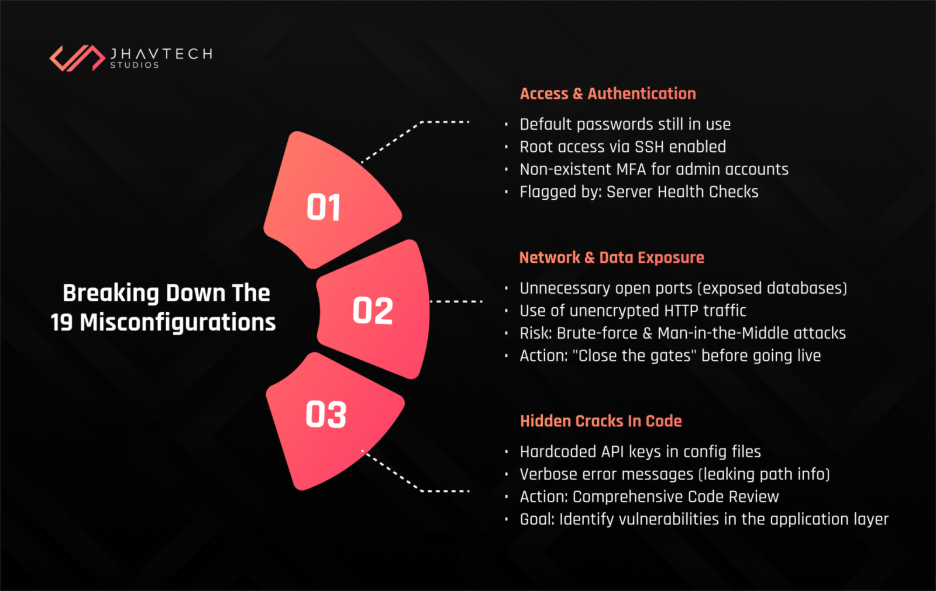
1. The Open Doors (Access and Authentication)
The first five issues were related to how people and systems accessed the server. We found default passwords that had never been changed since the initial setup. We also discovered that root access via SSH was enabled, which is like giving a stranger the master key to your entire building. Furthermore, multi-factor authentication (MFA) was non-existent for several administrative accounts.
In a modern environment, a regular server health check would have flagged these immediately. These are the “low-hanging fruit” for hackers. If you are not rotating keys or enforcing strong password policies, you are essentially inviting an intrusion.
2. Network Exposure and Data Leaks
The next set of issues involved how the server communicated with the outside world. We found several open ports that served no purpose for the business operations but were wide open to the public internet. This included an exposed database port, meaning anyone with the right tool could attempt to brute-force their way into the company’s most sensitive information.
We also noticed that unencrypted HTTP was still being used for certain internal redirects. While it might seem minor, unencrypted traffic is a goldmine for man-in-the-middle attacks. These types of common server misconfigurations in startups are often the result of developers trying to simplify the development process, but they rarely remember to “close the gates” when the code goes live.
3. The Hidden Cracks in the Code
Security is not just about the server settings; it is also about the software running on them. During our investigation, we recommended a comprehensive code review to identify vulnerabilities in the application layer that were interacting poorly with the server environment. We found hardcoded API keys tucked away in configuration files and verbose error messages that gave away sensitive path information to anyone who triggered a 404 error.
Why You Need a Consistent Server Health Check
You might think that once a server is set up, it stays secure. In reality, servers are living organisms. They require constant attention. A server health check is not a “one and done” task. It is a recurring process that ensures your configurations stay aligned with best practices as your software evolves.
When we work on mobile app development projects, we emphasise that the backend is just as important as the frontend. You can have a beautiful app, but if the server it talks to is misconfigured, your users’ data is at risk. A routine check-up looks at resource utilisation, security patches, and log files to ensure that everything is running as it should.
Moving from a Check to a Full Audit
While a health check is excellent for maintenance, there are times when you need to go deeper. This is where a server security audit comes into play. Unlike a standard check, an audit is a formal, comprehensive examination of your entire security posture. It looks at compliance, historical log data, and even the “human element” of how permissions are granted.
For the startup we assisted, the audit revealed that several former employees still had active accounts with administrative privileges. This is a massive security risk that a simple automated scan might miss. A thorough audit ensures that your infrastructure is not just functional, but resilient.
Strengthening the Foundation with Infrastructure Hardening
Once you identify the holes, you have to plug them. This process is known as Infrastructure Hardening. It involves stripping away any unnecessary software, services, or protocols that could serve as an attack vector. In Australia, we often look to the ASD Essential 8 as a framework for this.
Hardening your infrastructure means implementing the principle of least privilege. No user or system should have more access than they absolutely need to do their job. It also means ensuring that your UI/UX design reflects security best practices, such as not revealing too much information during the login process. Security and user experience should go hand in hand, creating a feeling of trust for the end-user.
Modern Solutions for Complex Problems
As startups grow, managing these configurations manually becomes impossible. This is why many organisations are turning to DevOps solutions to automate their infrastructure management. By using “Infrastructure as Code” (IaC), you can define your server settings in a script. This ensures that every new server you spin up is identical and follows your security protocols perfectly.
Automation removes the risk of human error, which was the root cause of almost all 19 misconfigurations we found in that startup. When a developer can deploy a server with a single click, and that server is automatically hardened and patched, the entire business moves faster and more safely.
When Things Go Wrong: Software Project Rescue
Sometimes, a company realises too late that its infrastructure is a mess. We have seen cases where a startup’s entire platform is so unstable and insecure that they need a software project rescue. This involves stepping in, stabilising the existing environment, fixing the critical security flaws, and creating a roadmap for a more sustainable future.
The startup we worked with was on the verge of this scenario. They were lucky we caught the 19 misconfigurations before a breach occurred. Had they waited another six months, the technical debt and security risks might have been too high to fix without a complete rebuild.
A Server Health Check Checklist for Australian Businesses
To help you get started, we have put together a basic server health check checklist for Australian businesses. While this is not a substitute for professional oversight, it will help you identify the most glaring issues.
The Essential Checklist:
- Update and Patch: Are all your operating systems and software packages up to date?
- Access Control: Have you disabled root SSH access and enabled MFA for all users?
- Firewall Rules: Are you only allowing traffic on the ports that are absolutely necessary?
- Log Management: Are you collecting and reviewing logs to spot suspicious activity?
- Backup Verification: Have you tested your backups recently to ensure they actually work?
- Encryption: Is all data in transit encrypted using modern TLS standards?
- Account Review: Have you removed accounts for employees who are no longer with the company?
Performing a server health check using these points will significantly reduce your risk profile. In the Australian market, where privacy laws like the Privacy Act 1988 are strictly enforced, being able to prove that you took reasonable steps to secure your data is vital.
Conclusion: Protecting Your Future
The 19 misconfigurations we found were not the result of incompetence. They were the result of a fast-growing company focusing on the “what” instead of the “how.” However, in the digital age, the “how” is what determines your longevity.
A regular server health check is the most cost-effective insurance policy you can have. It identifies vulnerabilities before they are exploited and ensures that your infrastructure can support your growth rather than hindering it. Whether you are a small team just starting out or a scaling enterprise, the security of your servers should never be an afterthought.
If you are unsure about the state of your infrastructure, do not wait for a red alert to find out. Contact us and conduct a server health check today. At Jhavtech Studios, we specialise in helping businesses navigate these technical challenges, ensuring that your backend is as robust as your vision. Your servers are the engine of your business. Keep them healthy, keep them secure, and they will take you wherever you want to go.
By staying proactive with a server health check, you are not just preventing a breach; you are building a foundation of trust with your customers. In a world where data is the new currency, that trust is your most valuable asset. Every server health check you perform is a step toward a more secure and successful future. Do not let your startup be the next cautionary tale. Take control of your infrastructure, address those misconfigurations, and move forward with confidence.
Final thought for today: how long has it been since your last server health check? If you have to think about the answer, it has probably been too long.