.svg)
.svg)


Custom Birth Chart Plugin for WordPress

Introduction
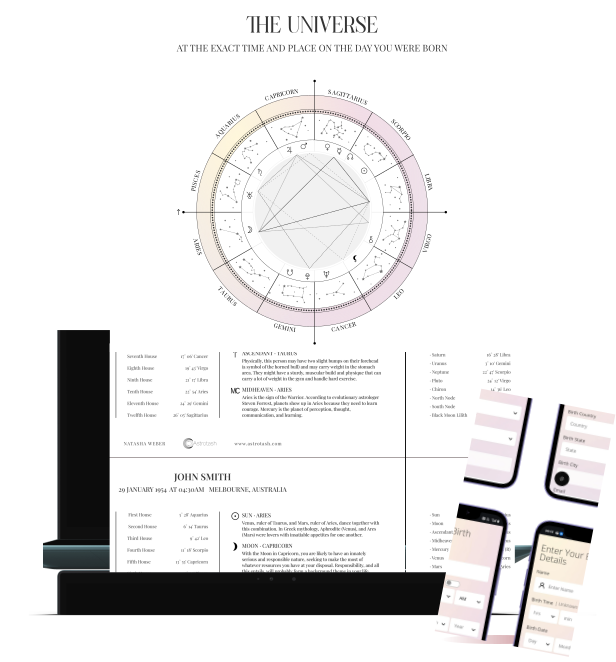
Jhavtech Studios collaborated with Astrotash.com to develop a custom astrology birth chart (natal chart) plugin for WordPress. This plugin enables users to create personalized birth charts, planetary positions, and astrological insights using just three inputs: Date of Birth, Time, and Place. It utilizes ephemeris data, the ACS Atlas database, and a tailored AstroChart library for precise calculations and attractive charts. Users can access their charts instantly on the website and receive a personalized PDF via email.

Introduction
Jhavtech Studios collaborated with Astrotash.com to develop a custom astrology birth chart (natal chart) plugin for WordPress. This plugin enables users to create personalized birth charts, planetary positions, and astrological insights using just three inputs: Date of Birth, Time, and Place. It utilizes ephemeris data, the ACS Atlas database, and a tailored AstroChart library for precise calculations and attractive charts. Users can access their charts instantly on the website and receive a personalized PDF via email.

Client Requirements
Astrotash approached us with a vision to enhance their astrology services with a seamless, interactive online tool.

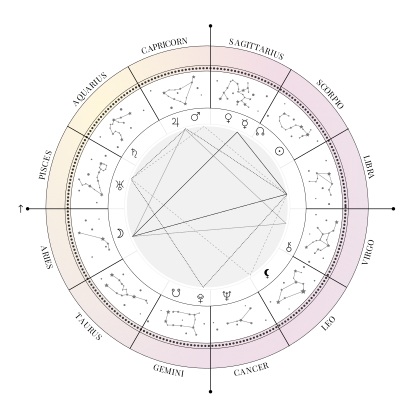

Accurate Birth Chart Generation using date, time, and location.

Default 12:00 PM chart generation for unknown birth times.

Custom WordPress plugin with Shortcode integration for easy embedding.

Frontend built with Node.js and custom chart visualisation.

Email module to send users their personalised chart in PDF format.

Email marketing integration with platforms like Mailchimp.

Geolocation integration for accurate city and timezone selection.
Our Solution
We developed a custom WordPress plugin that integrates seamlessly with Astrotash’s existing website.

Backend Integration
Node.js service for retrieving ephemeris data and calculating chart positions.

Lead Capture & Email Marketing
Automatic Mailchimp integration for newsletter subscriptions.

Customised SVG Chart Rendering
Tailored the AstroChart library to match the client’s branding and design.

Automated PDF Generation & Delivery
RabbitMQ-powered queue system with Gmail SMTP for sending birth charts.

Frontend Plugin Development
Custom Shortcode [birthchart_form] for embedding the birth chart form anywhere on the site.


Key Features Implemented




How It Works
When a user visits the Star Charts page, the form is displayed via a shortcode.

Data is stored in WordPress as a custom post type

User is added to the Mailchimp subscriber list

Node.js backend fetches data from the ephemeris and Atlas database

RabbitMQ worker generates a PDF version of the chart

The PDF is sent via SMTP email to the user

The AstroChart SVG is displayed instantly on the frontend

Design Process
The design focused on simplicity and usability while retaining detailed astrological information.

Name, Date of Birth, Time, and Location

Responsive SVG-based chart for desktop and mobile viewing.
Planetary Positions – Signs and degrees
Interpretations – Personalised summaries
House Cusps – Calculated from ascendant and timezone

Technology Stack
Backend


Node.js

Express.js

TypeScript

RabbitMQ

Puppeteer

.svg)
Frontend

PHP (Wordpress)

HTML

CSS

JS

JQuery
Charting
TypeScript

SVG

Custom AstroChart Library
Database

ACS Atlas

MySQL

Gmail SMTP

Mailchimp Integration

Development process
Research & POC
Our Astrotash Birth Chart Plugin development utilized a structured, multi-phase approach to ensure technical accuracy and a seamless user experience. We started with thorough research and a proof of concept (POC) to validate the workflow, data accuracy, and necessary integrations. This stage confirmed that our architecture — combining WordPress, Node.js, and ephemeris data integration — could provide precise astrological calculations at scale.

UI/UX Design
Following POC approval, our UI/UX team collaborated with the client to design a custom natal chart interface that reflected the Astrotash brand while prioritizing clarity and usability. After finalizing the design, our developers adapted the AstroChart SVG library to fit the new visual style, ensuring responsive, high-quality chart rendering on all devices.

Development & Integration
Simultaneously, we worked on multiple fronts:
Building the custom WordPress plugin with shortcode integration.
Developing the Node.js backend API for ephemeris and Atlas database queries.
Integrating essential third-party tools for email delivery and marketing automation.

Deployment & Scalability
We implemented a queue-based infrastructure with RabbitMQ for reliable performance, enabling efficient automated generation of personalized birth chart PDFs via Puppeteer, delivered instantly through SMTP email. This method ensured fast, accurate chart generation and a scalable framework for future enhancements like multilingual support, advanced interpretations, and extended marketing integrations.



Why This Project Stands Out
The Astrotash Birth Chart Plugin showcases how custom WordPress development and modern backend architecture can create interactive, accurate, and visually appealing astrology tools. This solution enhanced user engagement and opened new lead-generation avenues through integrated email marketing.
If you want to develop custom WordPress plugins, interactive calculators, or astrology software, contact Jhavtech Studios today.

Why This Project Stands Out
The Astrotash Birth Chart Plugin showcases how custom WordPress development and modern backend architecture can create interactive, accurate, and visually appealing astrology tools. This solution enhanced user engagement and opened new lead-generation avenues through integrated email marketing.
If you want to develop custom WordPress plugins, interactive calculators, or astrology software, contact Jhavtech Studios today.
See it in Action